Security Camera Installation

Compare reliable PoE, Wi-Fi, battery, local-storage, and cloud-connected camera systems before you buy. I serve Tucson, Oro Valley, the Catalina Foothills, and SaddleBrooke.

PLAN YOUR SYSTEM

Start with the outcome you want

Not every home needs the same camera system. Pick the result that matters most; the matching filters will open below and show which systems fit.

Click for the camera slideshow · 1/5

Example system planning

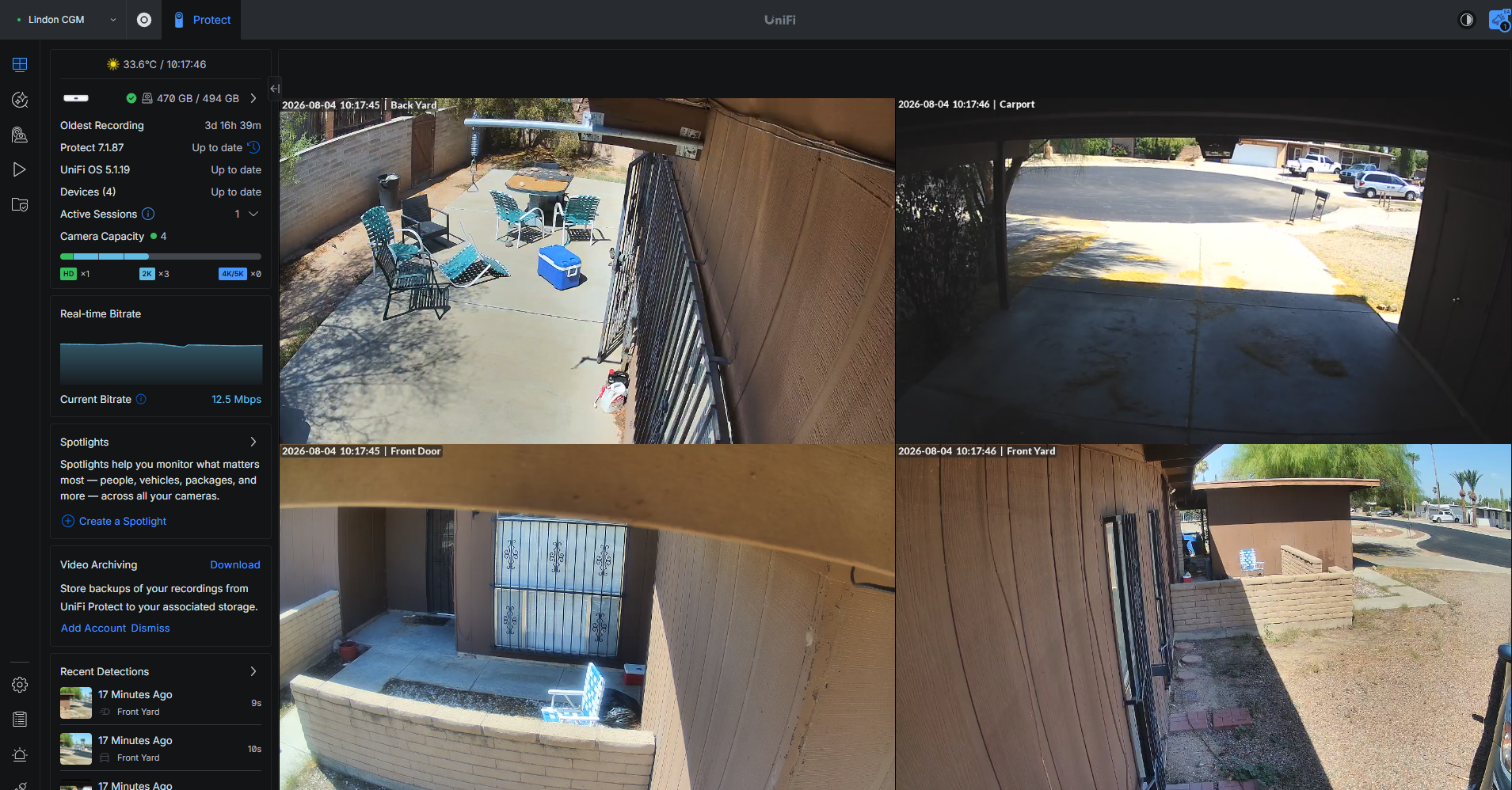
A recorder-based system keeps the evidence local

This UniFi Protect dashboard shows four camera views managed from one local system. Click the image to open the slideshow and compare what each camera actually sees.

I can help map the views, choose between PoE and Wi-Fi, plan storage, and configure secure remote access.

Copper standard · budget Wi-Fi

Wyze

Wyze is my low-cost Wi-Fi option for practical coverage, with supported models offering microSD recording, battery choices, and solar charging.

It is a good fit when price and a straightforward installation matter most.

Silver standard · flexible systems

Tapo, Eufy, Reolink, and Aqara

These systems make up a flexible middle tier, with Wi-Fi, battery, doorbell, local-storage, and smart-home options that vary by model.

I compare the exact camera, hub, recording path, and subscription before recommending a setup.

Gold standard · best overall

UniFi Protect

UniFi Protect is my gold standard for home and small-business security. PoE sends power and video over one cable, avoids battery maintenance, and gives a recorder-based system a dependable connection.

Recordings stay on the UniFi console without a required camera subscription, making it the strongest choice when identification, local evidence, and long-term reliability matter more than the lowest installation cost.

Camera systems integrate with smart homes in very different ways. Check the hub, alerts, storage, and automation path before you choose hardware.

Security camera installation in Tucson - Find the system

What matters most to you?

Show advanced camera filters

Technical filters

Connection
Storage and recording
Subscription
Features

Each selected filter category narrows the list; choices within one category are alternatives. Subscription labels describe the core recording path: “No required subscription” means local recording can work without a paid plan; cloud history, AI alerts, and other model-specific features may still require a plan.

Gold standard

UniFi Protect

Cost$$$$$

Professional local-first system with PoE cameras and an indoor recorder.

PoENVR4K optionsNo required feeCloud optional
  • Excellent reliability and expansion
  • Continuous local recording
  • Optional cloud backup

Higher upfront equipment cost, but no required camera subscription.

Premium local-storage option

eufy

Cost$$$$$

Local-storage cameras, HomeBase systems, and selected PoE or Wi-Fi options.

Local storagePoE optionsWi-Fi optionsDoorbells
  • No required monthly fee for local recording
  • Strong homeowner-friendly app and bundles
  • Model choices include local HomeBase and microSD storage

A premium-priced alternative when local storage and a polished consumer ecosystem matter.

Silver standard

Wyze

Cost$$$$$

The budget-friendly local-storage alternative when cable runs are difficult.

Wi-FiBattery optionsmicroSDSolar optionsDoorbells
  • Low hardware cost and removable batteries
  • Compatible cameras can record continuously or events-only to microSD without a subscription
  • Cloud plans add cloud history and advanced detection

Local recording and doorbell storage vary by model; battery-powered continuous recording needs careful power planning.

Homeowner option

Tapo

Cost$$$$$

Wi-Fi cameras and doorbells with local microSD recording and optional cloud plans.

Wi-FimicroSD24/7 local optionsDoorbells
  • Powered models can record continuously to microSD
  • Select solar battery models offer low-power 24/7 Capture
  • No subscription required for local storage

Check whether the selected model records full video or interval captures, and whether nearby power is required.

Homeowner option

Google Nest

Cost$$$$$

Wi-Fi cameras and doorbells covered by a Google Home Premium household plan.

Wi-FiCloud historyHousehold plan
  • One plan can cover multiple cameras
  • Strong app and alert experience
  • Less aligned with local-NVR installations

A reasonable fit when the household already uses Google Home.

Best Wi-Fi value

Reolink

Cost$$$$$

Strong Wi-Fi and battery/solar options with 4K models, vehicle detection, and local microSD recording.

Wi-Fi4K optionsmicroSDNo required fee
  • Argus models can add solar charging
  • Local recording without a required cloud plan
  • Battery models are easier to install where cable is costly

A practical step up from the lowest-cost Wi-Fi cameras for a street-facing view. Current Argus batteries are generally built in, not user-swappable. See Reolink Argus PT Ultra.

Cloud and deterrence option

Arlo

Cost$$$$$

Wi-Fi battery cameras and doorbells with strong alerts, lights, sirens, and optional solar charging.

Wi-FiBattery optionsSolar optionsCloud-centered
  • Good deterrence and person/vehicle alerts
  • Local backup requires a compatible SmartHub or base station
  • Cloud plan is the normal way to get the complete feature set

A capable homeowner system, but less independent than Reolink or UniFi when preserving evidence without cloud services.

Smart-home option

Aqara

Cost$$$$$

Wi-Fi cameras and doorbells sold directly in the U.S., with local storage and strong Apple Home, Google Home, and Matter integration on selected models.

Wi-FiLocal storageDoorbellsSmart-home focused
  • Not dealer-only: available from Aqara's U.S. online store and participating retailers
  • Model-dependent microSD, onboard, or HomeKit Secure Video storage
  • Some outdoor models are wired rather than battery powered

A good fit when smart-home integration matters; verify outdoor power, weather rating, and storage for the exact model. Browse Aqara cameras.

No systems match every selected filter. Try clearing one filter.

Not sure which system fits your property? I can compare the options and plan the camera views before you buy hardware.

GET A CAMERA PLAN
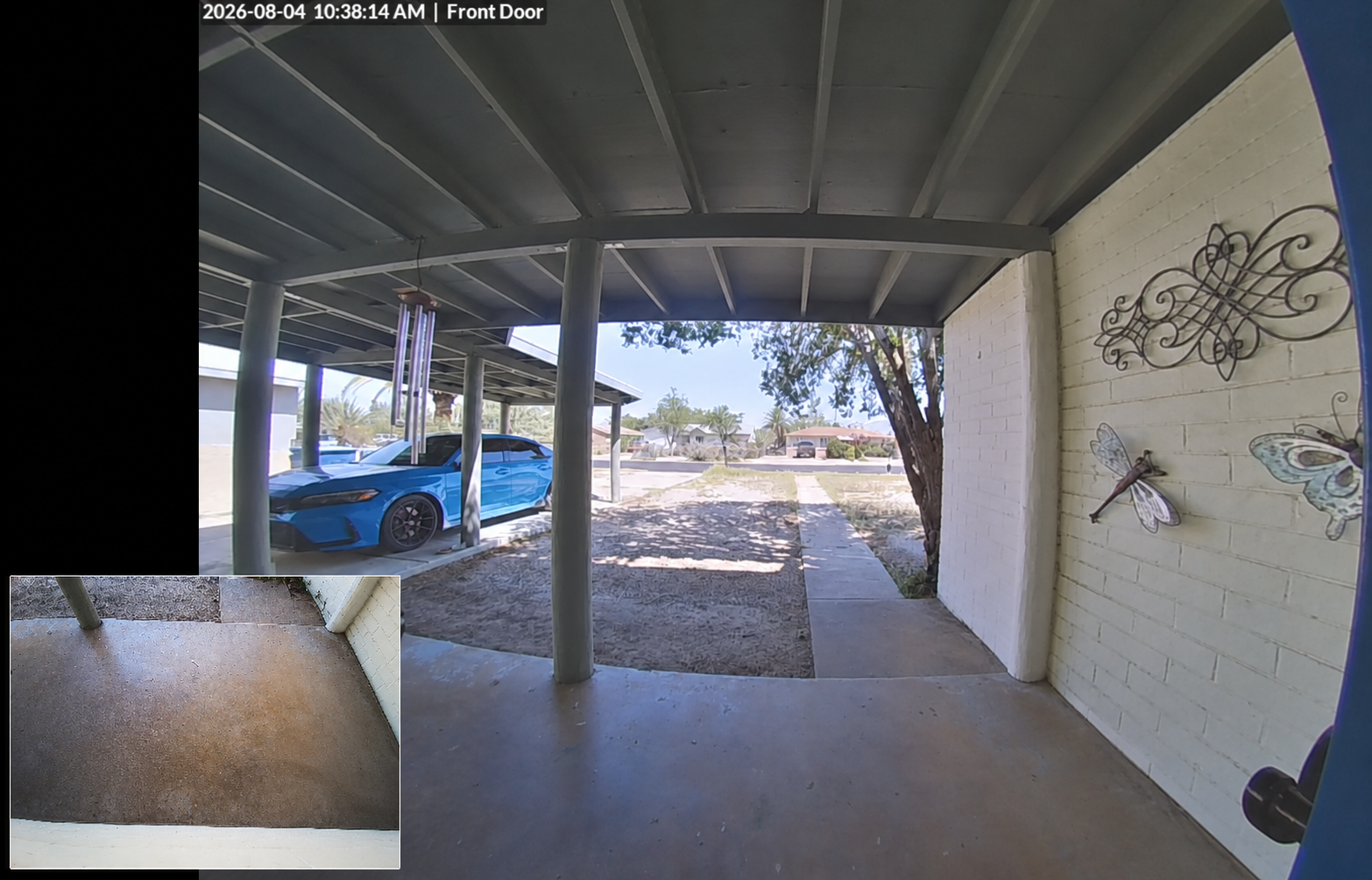
Doorbell camera view from a covered Tucson porch, including a picture-in-picture package-view camera of the entry area

Doorbell camera + package view

Plan the view before choosing the hardware

“There's no other handyman like Drew! He's reliable, prepared, and efficient. He helped set up my wifi and router, assembled small bookshelves, and even hung my Christmas lights. I've been completely satisfied with his work and attention to detail is his best skill. I would recommend him and will continue to call on him for any future projects.”Ronda Canale · January 2026
Subscription and recurring-cost comparisonCompare recurring costs by system

Here is the full list of systems on this page, with the recurring cost of the core recording path. A $0 required plan does not mean the hardware, microSD card, NVR, HomeBase, or off-site backup is free. Prices are current planning figures and should be checked at checkout because plans vary by model, region, and billing term.

SystemCore recording pathCurrent planning priceWhat the paid plan adds or changesOfficial information
UniFi ProtectLocal console/NVR recording$0 required
Console, storage, and network hardware are separate
Exported clips, UniFi Drive/UNAS, or another backup workflow are separate from the camera system.UniFi camera security
ReolinkmicroSD, NVR, or Home Hub local recording$0 required
Optional Cloud varies by model and region
Cloud adds an off-site copy for compatible standalone cameras. Home Hub packages are designed around local recording.Reolink Cloud
eufyHomeBase, NVR, or microSD local recording, model-dependentAbout $2.99/month and up
Cloud Backup pricing varies by model and region
Cloud Backup adds off-site history; compatible local-storage models can remain usable without a paid plan.eufy Cloud Backup
WyzemicroSD on supported models; motion/event recording is model- and power-dependentCam Plus: $2.99/month or $29.99/year per camera
Cam Unlimited: $9.99/month or $99/year
Cloud history, full-length events, and advanced alerts. Supported cameras can still use local microSD recording without a paid plan.Wyze service plans
TapomicroSD or hub local recordingFrom $3.49/month or $34.99/year
Tapo Care is optional
Tapo Care adds cloud history and related features; local microSD recording does not require a plan.Tapo Care
ArloCloud-centered; local backup requires a compatible SmartHub/Base StationSecure Plus: $7.99/month single camera, billed annually
$17.99/month unlimited, billed annually; Premium $24.99/month
Cloud history and smart detection. Annual-billing prices and coverage limits vary by plan; local backup needs compatible hub hardware.Arlo Secure
Google NestCloud-centered Google Home recordingStandard: $10/month or $100/year
Advanced: $20/month or $200/year
Longer event history and more advanced detection across cameras at the home. Battery cameras do not provide a local recorder.Google Home subscriptions
AqaraLocal storage, HomeKit Secure Video, or Aqara cloud, model-dependent$0 required for local/HomeKit recording
Cloud pricing varies by model and region
Cloud or HomeKit features depend on the exact camera, hub, and smart-home platform selected.Aqara cameras

Prices checked August 4, 2026 are planning figures, not quotes. Hardware, local storage, cloud storage, internet data, and off-site backup are separate costs. Verify the current price and camera compatibility before ordering.
Local storage, cloud storage, and network security

Local storage keeps recordings on the camera's microSD card, a HomeBase/SmartHub, or an NVR at the property. It can keep recording when the internet is down, but the recorder and network equipment still need power. A UPS for the router, Wi-Fi access point, and NVR is an important part of a resilient installation.

Cloud storage sends recordings off-site, which helps preserve evidence if someone steals or damages the camera or recorder. It usually adds a recurring fee and depends on an internet connection. Cloud storage should be treated as a second copy, not the only copy.

Cloud-connected cameras also deserve network isolation. I can place cameras and hubs on a dedicated camera VLAN, restrict their access to the devices and services they need, and keep them separated from personal computers, phones, and smart-home devices. Advanced networking, secure Wi-Fi, firmware updates, UPS planning, and remote-access controls are part of making the system dependable.

Camera-system planning and network security configuration starts at $80. Hardware, cabling, mounting, subscription plans, and larger installation projects are quoted separately.

Why Ring is not on my recommended list

Ring is easy to buy and simple to install, but I do not currently recommend it as a first choice for my clients. Its cloud-centered approach makes privacy, account security, and internet dependence more important considerations, while the subscription cost can push the total price higher than I think is justified for the recording and local-storage options it provides.

If someone already owns Ring, I can still help install more cameras or configure the system. For a new system, I would usually compare UniFi, Wyze, Reolink, eufy, or Tapo first, based on the homeowner's budget and need for local evidence.

Security camera installation questions

Can I use security cameras without a monthly subscription?

Yes, when the selected model supports microSD, a HomeBase or SmartHub, or a local NVR. A paid plan may still add cloud history, AI alerts, or off-site backup, so I verify the exact model before you buy.

Is PoE better than Wi-Fi for a primary security system?

PoE is usually the more dependable choice for cameras that need continuous recording because one cable carries power and video. Wi-Fi can be a practical lower-cost option where cable runs are difficult, but it needs strong coverage and a reliable power plan.

Can you install a doorbell or solar camera?

Yes. I can plan doorbell, battery, and solar-assisted cameras, then check mounting, Wi-Fi, charging, weather exposure, and the recording path for the specific model.

Do cloud cameras need their own network?

They should be isolated when possible. A dedicated camera VLAN or guest-style network limits what a compromised camera or hub can reach while preserving the phone and remote-viewing features you actually use.

Need help choosing a system?

I can compare the hardware, plan the camera views, run cable where it makes sense, and configure local recording and alerts.

REQUEST A CONSULTATION